.png?fit=max&auto=format&n=Uxrk2NMr-T8kBXBe&q=85&s=cf2493ba8c5d6b4ae04e088c8a414baf)
Obtaining Image Maps
- Cost: 1,250 Echos
- Purchase using
/shop
Supported Formats
Image Maps support the following image formats:- PNG
- JPG / JPEG
- WEBP
Animated GIFs are not supported.
Creating an Image Map
Use:<name>with the name of your image map<width>with the map width<height>with the map height
Uploading Your Image
After running the command, you will receive a link in chat. Click the link to open the ImageFrame Web UI, where you can upload the image you would like to use. Once the upload is complete, the image will automatically be processed and linked to your Image Map.Larger images require more maps. For example, a 2×2 Image Map uses 4 maps, while a 4×4 Image Map uses 16 maps.
Creating an Image Map Using Selected Frames
If you’ve already placed item frames, you can create an Image Map directly from your selection.Select Your Frames
Create the Image
Invisible Item Frames
Image Maps look best when displayed using Invisible Item Frames.Crafting Recipe
Place a Phantom Membrane in the center of a crafting table and surround it with 8 Item Frames.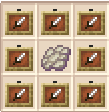
Invisible Item Frames Recipe
Obtaining Phantom Membranes
Phantom Membranes can be purchased at Hollow’s Market.- Visit
/marketor/sd - Purchase Phantom Membranes from player shops
Managing Image Maps
Common Uses
- 🏠 Base decoration
- 🛒 Shop advertisements
- 🎨 Artwork
- 📋 Signs and information boards
- 🎉 Community projects
- 🖼️ Photo galleries
Rules
All uploaded images must follow server rules. The following content is not allowed:- NSFW content
- Offensive or hateful imagery
- Harassment targeted at players
- Content that violates server rules
❓ Frequently Asked Questions
How do I upload an image?
How do I upload an image?
Run an ImageFrame create command and a link will be sent to you in chat. Open the link to access the ImageFrame Web UI and upload your image.
What image formats are supported?
What image formats are supported?
PNG, JPG/JPEG, and WEBP images are supported.
Do larger images require more maps?
Do larger images require more maps?
Yes. Larger dimensions use more maps and item frames.
Can I update an existing Image Map?
Can I update an existing Image Map?
Yes. Use
/imageframe refresh <name> to refresh an image from its source.Why should I use Invisible Item Frames?
Why should I use Invisible Item Frames?
Invisible Item Frames hide the frame itself, creating a cleaner and more seamless appearance for Image Maps.